
Pages

March 22, 2010

Gamesters of Triskelion

==
?

Like a few others, I am becoming increasingly concerned about the direction that Ubuntu seems to be headed. In essence, it seems that there is a concerted effort 1) to brand Ubuntu in such a way that it conceals the Linux that it is and 2) to do this in a way, along with some other stuff, to lock users into the OS. In other words, the motivation behind Ubuntu may not be to create a better Linux through which the parent Canonical will make money by providing support to Enterprise and other commercial users; rather the whole raison d'etre may be to develop a platform to market and sell to regular desktop users proprietary services that will increasingly come glued to the platform. And it just so happens that a Linux base provides most of the functionality for the required platform--as well as a core of well-meaning developers who are willing to work for free and who will have done all the heavy lifting for you

In other other words, I am concerned that the monetization of Ubuntu via content services is the gold standard and that the love-for-all goals stated in Canonical's publicity is just propaganda meant to get people on all sides on board. I really, really, really hope I am wrong and that I am being far, far, far too cynical because I've been well conditioned with the nutty stuff that Microsoft is known for doing, Apple has started doing, and Novell is doing with openSuSE.

In any case, based on my growing concern I did a tiny bit of research into Canonical Ltd. Just about everyone knows that it was founded by Mark Shuttleworth, who is (according to Wikipedia) South African by birth, a SA and UK citizen, and a space tourist. But not everyone may know that the company he founded to develop Ubuntu is registered in the Isle of Mann.

It's worth noting that the Isle of Mann is not part of the UK--it is a British Crown dependency. However, it is a great place to setup a business because, "The Isle of Man is a low tax economy with no capital gains tax, wealth tax, stamp duty, death duty or inheritance tax and income tax rates of 10% and 18%; corporation tax is at 0%." In fact it is quite well known as a center for offshore banking, and, "banking and other services now contribute the great bulk of GDP."

I now place the tinfoil hat firmly upon my head.

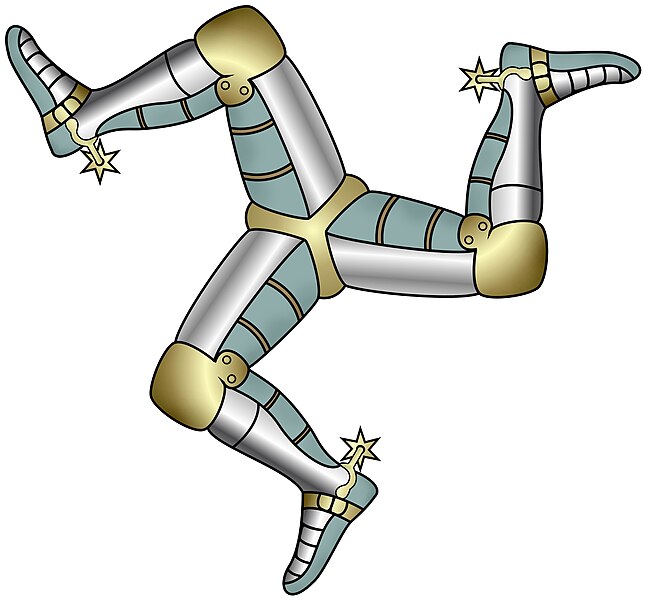
The national symbol of the Isle of Mann is the triskelion:

Compare this with:


Just a coincidence or a weird joke?

March 06, 2010

Karmic and Pulseaudio (not SOLVED)

I have been bitten by the bug reported at https://bugs.launchpad.net/pulseaudio/+bug/352732 . In fact, I was bitten by this back in Jaunty. There the problem was isolated to logging out of a non-Gnome session (and into Gnome? I forget exactly). In Jaunty I solved the problem by killing pulseaudio before terminating non-Gnome sessions. Now in Karmic this solution doesn’t seem to work in all situations, so I am trying the suggestion in post #77. Namely, in /etc/pulse/default.pa, comment out the line load-module module-device-restore

Here is the snippet from my /etc/pulse/default.pa:

### mfk addition: comment out "load-module module-device-restore"
### see https://bugs.launchpad.net/pulseaudio/+bug/352732 #77
#load-module module-device-restore

We’ll see how it goes.

Update (2010-03-10)
I just noticed that my soundcard input selection is being disrespected. There are two inputs on my lappy, and the system always defaults to input 1 no matter what. I don't know if this is related to the above or not.

Update (2010-03-12)
I re-enabled load-module module-device-restore , and my input settings began to be respected. However, the trashing of output settings returned. So ... pick your poison. I guess I am coming down on the side of those who complain that Pulseaudio is (still) not ready for prime time. Or is this a problem with the way it's implemented in Ubuntu? 

February 15, 2010

Karmic, openbox, and messed up desktop numbers (SOLVED)

I think it started after I upgraded to Karmic. When logging into an openbox session, the number of desktops I was getting was equal to one ... no matter what I set the number to during the previous session. Herein I describe a fix.

The script that gets called when GDM starts up an openbox session is /usr/bin/openbox-session. It just so happens that before I upgraded to Karmic, I had created a new script in /usr/local/bin/skinnydebbie-session that was a copy of the Jaunty version of /usr/bin/openbox-session with a few changes in the config files called. The interesting thing was that after the Karmic upgrade I did not have the wrong-number-of-desktops problem when starting from /usr/local/bin/skinnydebbie-session.; it only manifested itself when starting from /usr/bin/openbox-session. A quick comparison of the two files revealed a fix. At the top of my /usr/local/bin/skinnydebbie-session is the following snippet of code which I am sure was inherited from the Jaunty version of /usr/bin/openbox-session and was probably left off the Karmic version:

# Clean up after GDM
xprop -root -remove _NET_NUMBER_OF_DESKTOPS \
      -remove _NET_DESKTOP_NAMES \
      -remove _NET_CURRENT_DESKTOP 2> /dev/null

I added this snippet to my ~/.config/openbox/autostart.sh and voila! I get the right number of desktops. I am pretty sure it would work if I added it to /usr/bin/openbox-session instead.

This should probably be a bug report, but I'm feeling a bit too lazy now to do it.

January 23, 2010

Squeeze and the Java plugin (SOLVED)

Another Squeeze issue popped up: the Sun Java plugin (i.e., sun-java6-plugin) doesn't work. It took a bit of poking around to find a fix, but here it is. As root in a terminal:

# nano /etc/sysctl.d/bindv6only.conf

Then change
net.ipv6.bindv6only = 1
to
net.ipv6.bindv6only = 0

Finally,
# invoke-rc.d procps restart

I have no idea what other positive or negative ramifications this will have to your system, so proceed with caution. I'm pretty sure you can undo any damage by setting the 0 back to 1 and doing the invoke-rc.d call over.

FWIW, the icedtea6-plugin doesn't work either, but I haven't been able to figure out that one.

January 16, 2010

Squeeze and GRUB dual boot problems (SOLVED)

Earlier this evening, I installed a command-line version of Debian Squeeze (i.e., still "testing" as of this writing) from the netinstall CD alongside a regular Ubuntu Karmic installation and had an issue with GRUB that nearly had me cleaning my underwear.

Toward the end of the installation, the Debian installer told me that it saw I had Ubuntu installed and so would I want to install GRUB? It also assured me that it recognized that I had Ubuntu installed and that everything would be ok.

I've been through similar prompts with dual-boot installations before, and indeed everything has always gone just swimmingly. So, I said, "Sure." What I didn't know was that Squeeze is using the new and possibly-not-entirely-ready-for-prime-time GRUB 2. (I guess Karmic is as well.)

When I rebooted, GRUB gave me options for the new Squeeze install, but any trace of the Ubuntu install was gone. Hunting for /boot/grub/menu.lst gave me nothing. That's when I discovered that Squeeze installed GRUB 2 and most of the GRUB repair stuff on the Internet was obsolete. I was about the resort to drastic measures when this post inspired me to try

# update-grub

and it worked.

January 02, 2010

Changing keyboard layouts

Just a quick post to mention an easy way to change keyboard layouts. From the command line:

setxkbmap [layout]

For example, I sometimes need to switch to Turkish Q:

setxkbmap tr

And then back to US:

setxkbmap us

Cheers.

December 17, 2009

JWM and GDM in Ubuntu

JWM is a lean yet featureful window manager. It's the default WM in Puppy Linux and Damn Small Linux. I wanted to do some work with JWM on my Ubuntu Jaunty machine, but I noticed after installing it I didn't get an entry in the GDM login screen giving me the option of using it. Fortunately, this is easy to fix.

As root, create a file called jwm.desktop in /usr/share/xsessions containing the text below:
[Desktop Entry]
Encoding=UTF-8
Name=JWM session
Comment=Use this session to run JWM as your desktop environment
Exec=jwm
Icon=
Type=Application

(Note that the file has to be in /usr/share/xsessions -- it won't work if you put it in /usr/local/share/xsessions even though you'd think it should.)

Logout, and you should now have an entry that reads "JWM session" in GDM's session selector that starts JWM.